mobx
Simple, scalable state management.
About
Simple, scalable state management.
What detecting mobx tells you about a site
mobx reveals observable, reactive state with automatic dependency tracking — a mutate-and-react model that is the philosophical opposite of Redux's immutable reducers. Its presence often signals an older or enterprise React app, or a team that strongly prefers transparent reactivity over explicit dispatching.
Why the exact mobx version matters
MobX 6 dropped decorators as the default in favour of `makeObservable`, a significant migration from earlier versions; the exact version tells you which observability API the code uses.
mobx in a real-world stack
When you find mobx in a bundle, it rarely travels alone. mobx-react or mobx-react-lite as the React binding, and often a class-based store architecture.
Quick facts
npm install mobxHow Sourcemap Explorer detects mobx
mobx ships as v7.0.0, published 2026-07-30 and carries 0 direct dependencies, 261 versions on the registry. Those exact numbers are the footprint Sourcemap Explorer matches when mobx rides inside a deployed bundle — here is how the detection works.
We catch mobx from two complementary signals: bundled source paths and the embedded package.json. Modern bundlers (webpack, Vite, esbuild, Rollup, Turbopack) preserve the original node_modules/mobx/ paths inside the JavaScript sourcemap's sources[] array — that's the canonical signal. When the matching package.json is also captured in sourcesContent[], we read the exact version field — patch number included. No regex guessing, no version inference.
- 1
Confirm the site exposes sourcemaps
In DevTools Network, check the response headers of any application script for `SourceMap` or `X-SourceMap`. Failing that, fetch the script's last 4 KB and look for a `//# sourceMappingURL=` comment — that map is where the `mobx` paths live.
- 2
Find the package in the bundle
Open DevTools → Network → reload. Click any application script and look at its sourcemap. Inside, search `sources[]` for entries matching `node_modules/mobx/` — every match confirms the package is bundled. The matching `sourcesContent[i]` for `node_modules/mobx/package.json` gives you the exact installed version.
- 3
Read the version directly from package.json
Run `jq -r '. as $m | $m.sources | to_entries[] | select(.value | endswith("node_modules/mobx/package.json")) | $m.sourcesContent[.key] | fromjson | .version' bundle.js.map`. Sourcemap Explorer automates the same query in the popup.
Major releases of mobx
When each major version first landed. Major bumps are where breaking changes live, so this timeline is the fastest way to date the mobx version a site actually ships against the ecosystem.
Recent versions
mobx README
Live mirror of the GitHub README, for reference. Updated whenever the repo's default branch changes.

MobX
Simple, scalable state management.






Documentation
Documentation can be found at mobx.js.org.
Sponsors
MobX is made possible by the generosity of the sponsors below, and many other individual backers. Sponsoring directly impacts the longevity of this project.
🥇🥇 Platinum sponsors ($5000+ total contribution): 🥇🥇



🥇 Gold sponsors ($2500+ total contribution):











🥈 Silver sponsors ($500+ total contributions):











Introduction
Anything that can be derived from the application state, should be. Automatically.
MobX is a signal based, battle-tested library that makes state management simple and scalable by transparently applying functional reactive programming. The philosophy behind MobX is simple:
Straightforward
Write minimalistic, boilerplate-free code that captures your intent. Trying to update a record field? Simply use a normal JavaScript assignment — the reactivity system will detect all your changes and propagate them out to where they are being used. No special tools are required when updating data in an asynchronous process.
Effortless optimal rendering
All changes to and uses of your data are tracked at runtime, building a dependency tree that captures all relations between state and output. This guarantees that computations that depend on your state, like React components, run only when strictly needed. There is no need to manually optimize components with error-prone and sub-optimal techniques like memoization and selectors.
Architectural freedom
MobX is unopinionated and allows you to manage your application state outside of any UI framework. This makes your code decoupled, portable, and above all, easily testable.
A quick example
So what does code that uses MobX look like?
import React from "react"
import ReactDOM from "react-dom"
import { makeAutoObservable } from "mobx"
import { observer } from "mobx-react-lite"

// Model the application state.
const myTimer = makeAutoObservable({
    secondsPassed: 0,
    increase() {
        this.secondsPassed += 1
    },
    reset() {
        this.secondsPassed = 0
    }
})

// Build a "user interface" that uses the observable state.
const TimerView = observer(({ timer }) => (
    <button onClick={() => timer.reset()}>Seconds passed: {timer.secondsPassed}</button>
))

ReactDOM.render(<TimerView timer={myTimer} />, document.body)

// Update the 'Seconds passed: X' text every second.
setInterval(() => {
    myTimer.increase()
}, 1000)
The observer wrapper around the TimerView React component will automatically detect that rendering
depends on the timer.secondsPassed observable, even though this relationship is not explicitly defined. The reactivity system will take care of re-rendering the component when precisely that field is updated in the future.
Every event (onClick / setInterval) invokes an action (myTimer.increase / myTimer.reset) that updates observable state (myTimer.secondsPassed).
Changes in the observable state are propagated precisely to all computations and side effects (TimerView) that depend on the changes being made.
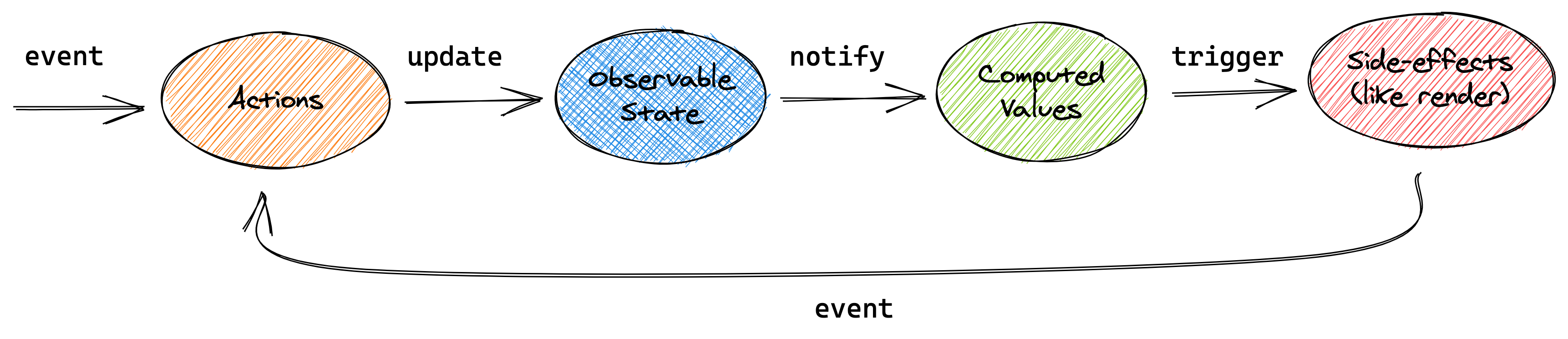
This conceptual picture can be applied to the above example, or any other application using MobX.
Getting started
To learn about the core concepts of MobX using a larger example, check out The gist of MobX page, or take the 10 minute interactive introduction to MobX and React. The philosophy and benefits of the mental model provided by MobX are also described in great detail in the blog posts UI as an afterthought and How to decouple state and UI (a.k.a. you don’t need componentWillMount).
Further resources
- The MobX cheat sheet (£5) is both useful and sponsors the project
- 10 minute interactive introduction to MobX and React
- Egghead.io course, based on MobX 3
- The MobX awesome list – a long list of MobX resources and example projects
The MobX book
The MobX Quick Start Guide ($24.99) by Pavan Podila and Michel Weststrate is available as an ebook, paperback, and on the O'Reilly platform (see preview).
Videos
- Introduction to MobX & React in 2020 by Leigh Halliday, 17 min.
- ReactNext 2016: Real World MobX by Michel Weststrate, 40 min, slides.
- CityJS 2020: MobX, from mutable to immutable, to observable data by Michel Weststrate, 30 min.
- OpenSourceNorth: Practical React with MobX (ES5) by Matt Ruby, 42 min.
- HolyJS 2019: MobX and the unique symbiosis of predictability and speed by Michel Weststrate, 59 min.
- React Amsterdam 2016: State Management Is Easy by Michel Weststrate, 20 min, slides.
- {🚀} React Live 2019: Reinventing MobX by Max Gallo, 27 min.
Credits
MobX is inspired by reactive programming principles, which are for example used in spreadsheets. It is inspired by model–view–viewmodel frameworks like MeteorJS's Tracker, Knockout and Vue.js, but MobX brings transparent functional reactive programming (TFRP, a concept which is further explained in the MobX book) to the next level and provides a standalone implementation. It implements TFRP in a glitch-free, synchronous, predictable and efficient manner.
A ton of credit goes to Mendix, for providing the flexibility and support to maintain MobX and the chance to prove the philosophy of MobX in a real, complex, performance critical applications.
FAQ
What is mobx used for?
Simple, scalable state management.
How can I tell if a website is using mobx?
Open the page in Chrome with the Sourcemap Explorer extension installed and read the Stack tab. We catch `mobx` from two complementary signals: `node_modules/mobx/` paths inside the JavaScript sourcemap, and the embedded `package.json` we read for exact-version detection. Without the extension you can do the same lookup manually in DevTools — the steps are listed in the "How Sourcemap Explorer detects" section above.
How do I find out which version of mobx a website is running?
Read it straight from the site's JavaScript sourcemap. When a build ships source maps, the bundled `mobx/package.json` carries the exact `version` string — Sourcemap Explorer extracts it in one click on the Stack tab, and you can do it by hand in DevTools by opening the `.map` file and searching for `node_modules/mobx/package.json`. That is far more reliable than inferring the version from an asset-hash or a `?ver=` query string, which is all surface-level detectors have to go on. The current npm release is 7.0.0, but real deployments frequently run an older pinned version — which is exactly why reading the bundled number matters.
What is the latest version of mobx?
7.0.0, as published on the npm registry. The "Recent versions" table on this page lists the most recent 8 releases with their release dates. Sourcemap Explorer reports the version actually bundled into a site, which can lag the latest release by months on real-world deployments.
Is mobx actively maintained?
Very actively maintained — the last release shipped within the past three months. The last published release was 2026-07-30. Source code: https://github.com/mobxjs/mobx.
Where can I read more?
Project homepage: https://mobx.js.org/. Source code: https://github.com/mobxjs/mobx. Published on npm: https://www.npmjs.com/package/mobx. Licensed as MIT.
Keep reading on Sourcemap Explorer
Detection deep dives
Alternative tools
Detected by Sourcemap Explorer
When a bundle ships sourcemaps, we read the embedded package.json for mobx and report the precise version (the registry's latest is v7.0.0, published 2026-07-30; the bundled copy is often older). Without sourcemaps, an import / require in the page's scripts is enough to flag it.