
valtio
🧙 Valtio makes proxy-state simple for React and Vanilla
About
🧙 Valtio makes proxy-state simple for React and Vanilla
What detecting valtio tells you about a site
Valtio points to a React app that wanted global state without the ceremony of Redux. It is a proxy-based store: you mutate a plain object and components re-render based on what they actually read. Finding it tells you the team preferred mutable, almost MobX-like ergonomics over reducers and action types, and that they likely came from the Poimandres orbit, since valtio sits alongside zustand and jotai in that family. Its presence suggests a pragmatic, small-state-management approach, often in apps that needed shared client state but found a full flux setup overkill.
Why the exact valtio version matters
Valtio's snapshot and subscription internals have evolved across versions, particularly around React's concurrent rendering and the useSnapshot hook's behaviour, so the version affects how safely state is read during transitions. The major version also tracks compatibility with specific React releases, which is worth knowing when the proxy layer interacts with concurrent features.
valtio in a real-world stack
When you find valtio in a bundle, it rarely travels alone. Other Poimandres libraries like zustand or jotai, and frequently react-three-fiber in 3D-heavy apps.
Quick facts
npm install valtioCommon pairings
Packages this one expects to find in the same project. Each is also a Sourcemap Explorer detection target.
What valtio pulls in
valtio declares 1 direct dependency — each one also rides into any bundle that ships valtio, so they are detection targets too. Reading them is a quick way to understand the package's real footprint .
How Sourcemap Explorer detects valtio
valtio ships as v2.3.2, published 2026-05-01 and carries 1 direct dependency, 2 peer dependencies (react, @types/react), 122 versions on the registry. Those exact numbers are the footprint Sourcemap Explorer matches when valtio rides inside a deployed bundle — here is how the detection works.
We catch valtio from two complementary signals: bundled source paths and the embedded package.json. Modern bundlers (webpack, Vite, esbuild, Rollup, Turbopack) preserve the original node_modules/valtio/ paths inside the JavaScript sourcemap's sources[] array — that's the canonical signal. When the matching package.json is also captured in sourcesContent[], we read the exact version field — patch number included. No regex guessing, no version inference.
- 1
Confirm the site exposes sourcemaps
In DevTools Network, check the response headers of any application script for `SourceMap` or `X-SourceMap`. Failing that, fetch the script's last 4 KB and look for a `//# sourceMappingURL=` comment — that map is where the `valtio` paths live.
- 2
Find the package in the bundle
Open DevTools → Network → reload. Click any application script and look at its sourcemap. Inside, search `sources[]` for entries matching `node_modules/valtio/` — every match confirms the package is bundled. The matching `sourcesContent[i]` for `node_modules/valtio/package.json` gives you the exact installed version.
- 3
Read the version directly from package.json
Run `jq -r '. as $m | $m.sources | to_entries[] | select(.value | endswith("node_modules/valtio/package.json")) | $m.sourcesContent[.key] | fromjson | .version' bundle.js.map`. Sourcemap Explorer automates the same query in the popup.
Major releases of valtio
When each major version first landed. Major bumps are where breaking changes live, so this timeline is the fastest way to date the valtio version a site actually ships against the ecosystem.
Recent versions
valtio README
Live mirror of the GitHub README, for reference. Updated whenever the repo's default branch changes.

npm install valtio makes proxy-state simple





Wrap your state object
Valtio turns the object you pass it into a self-aware proxy.
import { proxy, useSnapshot } from 'valtio'

const state = proxy({ count: 0, text: 'hello' })
Mutate from anywhere
You can make changes to it in the same way you would to a normal js-object.
setInterval(() => {
  ++state.count
}, 1000)
React via useSnapshot
Create a local snapshot that catches changes. Rule of thumb: read from snapshots in render function, otherwise use the source. The component will only re-render when the parts of the state you access have changed, it is render-optimized.
// This will re-render on `state.count` change but not on `state.text` change
function Counter() {
  const snap = useSnapshot(state)
  return (
    <div>
      {snap.count}
      <button onClick={() => ++state.count}>+1</button>
    </div>
  )
}
Note for TypeScript users: Return type of useSnapshot can be too strict.
The snap variable returned by useSnapshot is a (deeply) read-only object.
Its type has readonly attribute, which may be too strict for some use cases.
To mitigate typing difficulties, you might want to loosen the type definition:
declare module 'valtio' {
  function useSnapshot<T extends object>(p: T): T
}
See #327 for more information.
Note: useSnapshot returns a new proxy for render optimization.
Internally, useSnapshot calls snapshot in valtio/vanilla,
and wraps the snapshot object with another proxy to detect property access.
This feature is based on proxy-compare.
Two kinds of proxies are used for different purposes:
proxy()fromvaltio/vanillais for mutation tracking or write tracking.createProxy()fromproxy-compareis for usage tracking or read tracking.
Use of this is for expert users.
Valtio tries best to handle this behavior
but it's hard to understand without familiarity.
const state = proxy({
  count: 0,
  inc() {
    ++this.count
  },
})
state.inc() // `this` points to `state` and it works fine
const snap = useSnapshot(state)
snap.inc() // `this` points to `snap` and it doesn't work because snapshot is frozen
To avoid this pitfall, the recommended pattern is not to use this and prefer arrow function.
const state = proxy({
  count: 0,
  inc: () => {
    ++state.count
  },
})
If you are new to this, it's highly recommended to use eslint-plugin-valtio.
Subscribe from anywhere
You can access state outside of your components and subscribe to changes.
import { subscribe } from 'valtio'

// Subscribe to all state changes
const unsubscribe = subscribe(state, () =>
  console.log('state has changed to', state),
)
// Unsubscribe by calling the result
unsubscribe()
You can also subscribe to a portion of state.
const state = proxy({ obj: { foo: 'bar' }, arr: ['hello'] })

subscribe(state.obj, () => console.log('state.obj has changed to', state.obj))
state.obj.foo = 'baz'

subscribe(state.arr, () => console.log('state.arr has changed to', state.arr))
state.arr.push('world')
To subscribe to a primitive value of state, consider subscribeKey in utils.
import { subscribeKey } from 'valtio/utils'

const state = proxy({ count: 0, text: 'hello' })
subscribeKey(state, 'count', (v) =>
  console.log('state.count has changed to', v),
)
There is another util watch which might be convenient in some cases.
import { watch } from 'valtio/utils'

const state = proxy({ count: 0 })
const stop = watch((get) => {
  console.log('state has changed to', get(state)) // auto-subscribe on use
})
Suspend your components
Valtio is compatible with React 19 use hook. This eliminates all the async back-and-forth, you can access your data directly while the parent is responsible for fallback state and error handling.
import { use } from 'react' // React 19
// import { use } from 'react18-use' // React 18

const state = proxy({ post: fetch(url).then((res) => res.json()) })

function Post() {
  const snap = useSnapshot(state)
  return <div>{use(snap.post).title}</div>
}

function App() {
  return (
    <Suspense fallback={<span>waiting...</span>}>
      <Post />
    </Suspense>
  )
}
It still suffers from "de-opt", which prevents useTransition to work well. To mitigate it, there is a third-party library use-valtio.
Holding objects in state without tracking them
This may be useful if you have large, nested objects with accessors that you don't want to proxy. ref allows you to keep these objects inside the state model.
See #61 and #178 for more information.
import { proxy, ref } from 'valtio'

const state = proxy({
  count: 0,
  dom: ref(document.body),
})
Update transiently (for often occurring state-changes)
You can read state in a component without causing re-render.
function Foo() {
  const { count, text } = state
  // ...
Or, you can have more control with subscribing in useEffect.
function Foo() {
  const total = useRef(0)
  useEffect(() => subscribe(state.arr, () => {
    total.current = state.arr.reduce((p, c) => p + c)
  }), [])
  // ...
Update synchronously
By default, state mutations are batched before triggering re-render.
Sometimes, we want to disable the batching.
The known use case of this is <input> #270.
function TextBox() {
  const snap = useSnapshot(state, { sync: true })
  return (
    <input value={snap.text} onChange={(e) => (state.text = e.target.value)} />
  )
}
Dev tools
You can use Redux DevTools Extension for plain objects and arrays.
import { devtools } from 'valtio/utils'

const state = proxy({ count: 0, text: 'hello' })
const unsub = devtools(state, { name: 'state name', enabled: true })
Manipulating state with Redux DevTools
The screenshot below shows how to use Redux DevTools to manipulate state. First select the object from the instances drop down. Then type in a JSON object to dispatch. Then click "Dispatch". Notice how it changes the state.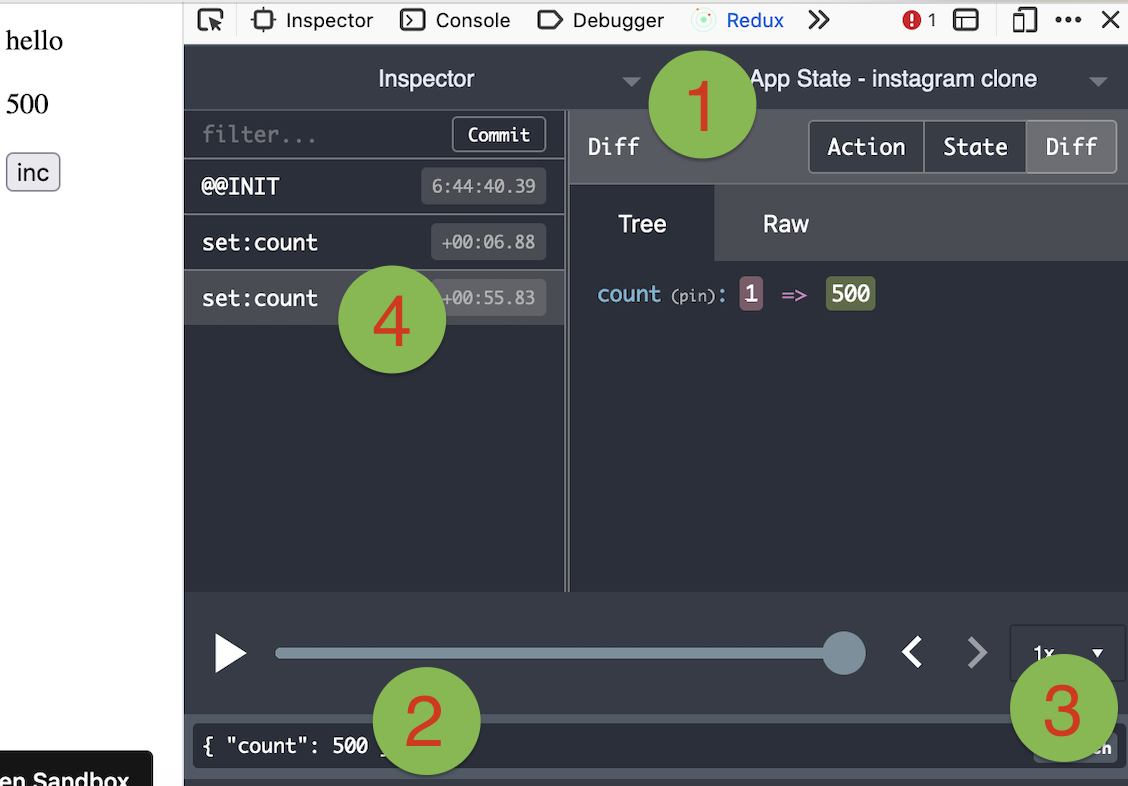
Use it vanilla
Valtio is not tied to React, you can use it in vanilla-js.
import { proxy, subscribe, snapshot } from 'valtio/vanilla'
// import { ... } from 'valtio/vanilla/utils'

const state = proxy({ count: 0, text: 'hello' })

subscribe(state, () => {
  console.log('state is mutated')
  const obj = snapshot(state) // A snapshot is an immutable object
})
useProxy util
While the separation of proxy state and its snapshot is important, it's confusing for beginners. We have a convenient util to improve developer experience. useProxy returns shallow proxy state and its snapshot, meaning you can only mutate on root level.
import { useProxy } from 'valtio/utils'

const state = proxy({ count: 1 })

const Component = () => {
  // useProxy returns a special proxy that can be used both in render and callbacks
  // The special proxy has to be used directly in a function scope. You can't destructure it outside the scope.
  const $state = useProxy(state)
  return (
    <div>
      {$state.count}
      <button onClick={() => ++$state.count}>+1</button>
    </div>
  )
}
Computed properties
You can define computed properties with object getters.
const state = proxy({
  count: 1,
  get doubled() {
    return this.count * 2
  },
})
Consider it as an advanced usage, because the behavior of this is sometimes confusing.
For more information, check out this guide.
proxySet util
This is to create a proxy which mimic the native Set behavior. The API is the same as Set API
import { proxySet } from 'valtio/utils'

const state = proxySet([1, 2, 3])
//can be used inside a proxy as well
//const state = proxy({
//    count: 1,
//    set: proxySet()
//})

state.add(4)
state.delete(1)
state.forEach((v) => console.log(v)) // 2,3,4
proxyMap util
This is to create a proxy which emulate the native Map behavior. The API is the same as Map API
import { proxyMap } from 'valtio/utils'

const state = proxyMap([
  ['key', 'value'],
  ['key2', 'value2'],
])
state.set('key', 'value')
state.delete('key')
state.get('key') // ---> value
state.forEach((value, key) => console.log(key, value)) // ---> "key", "value", "key2", "value2"
Compatibility
Valtio v2 works with React 18 and up.
It only depends on react and works with any
renderers such as react-dom, react-native, react-three-fiber, and so on.
Valtio works on Node.js, Next.js and other frameworks.
Valtio also works without React. See vanilla.
Plugins
Recipes
Valtio is unopinionated about best practices. The community is working on recipes.
FAQ
What is valtio used for?
🧙 Valtio makes proxy-state simple for React and Vanilla
How can I tell if a website is using valtio?
Open the page in Chrome with the Sourcemap Explorer extension installed and read the Stack tab. We catch `valtio` from two complementary signals: `node_modules/valtio/` paths inside the JavaScript sourcemap, and the embedded `package.json` we read for exact-version detection. Without the extension you can do the same lookup manually in DevTools — the steps are listed in the "How Sourcemap Explorer detects" section above.
How do I find out which version of valtio a website is running?
Read it straight from the site's JavaScript sourcemap. When a build ships source maps, the bundled `valtio/package.json` carries the exact `version` string — Sourcemap Explorer extracts it in one click on the Stack tab, and you can do it by hand in DevTools by opening the `.map` file and searching for `node_modules/valtio/package.json`. That is far more reliable than inferring the version from an asset-hash or a `?ver=` query string, which is all surface-level detectors have to go on. The current npm release is 2.3.2, but real deployments frequently run an older pinned version — which is exactly why reading the bundled number matters.
What is the latest version of valtio?
2.3.2, as published on the npm registry. The "Recent versions" table on this page lists the most recent 8 releases with their release dates. Sourcemap Explorer reports the version actually bundled into a site, which can lag the latest release by months on real-world deployments.
Is valtio actively maintained?
Actively maintained — the package is shipping new releases at a steady cadence. The last published release was 2026-05-01. Source code: https://github.com/pmndrs/valtio.
Where can I read more?
Project homepage: https://github.com/pmndrs/valtio. Source code: https://github.com/pmndrs/valtio. Published on npm: https://www.npmjs.com/package/valtio. Licensed as MIT.
Keep reading on Sourcemap Explorer
Detection deep dives
Alternative tools
Detected by Sourcemap Explorer
When a bundle ships sourcemaps, we read the embedded package.json for valtio and report the precise version (the registry's latest is v2.3.2, published 2026-05-01; the bundled copy is often older). Without sourcemaps, an import / require in the page's scripts is enough to flag it.