
TablePress – Tables in WordPress made easy
About TablePress – Tables in WordPress made easy
Boost your website with feature-rich tables that your visitors will love!
TablePress is the most popular and highest-rated WordPress table plugin.
- Easily create, edit, and manage beautiful and modern data tables, from simple price lists to searchable directories, product and model tables, inventories, schedules, and research datasets.
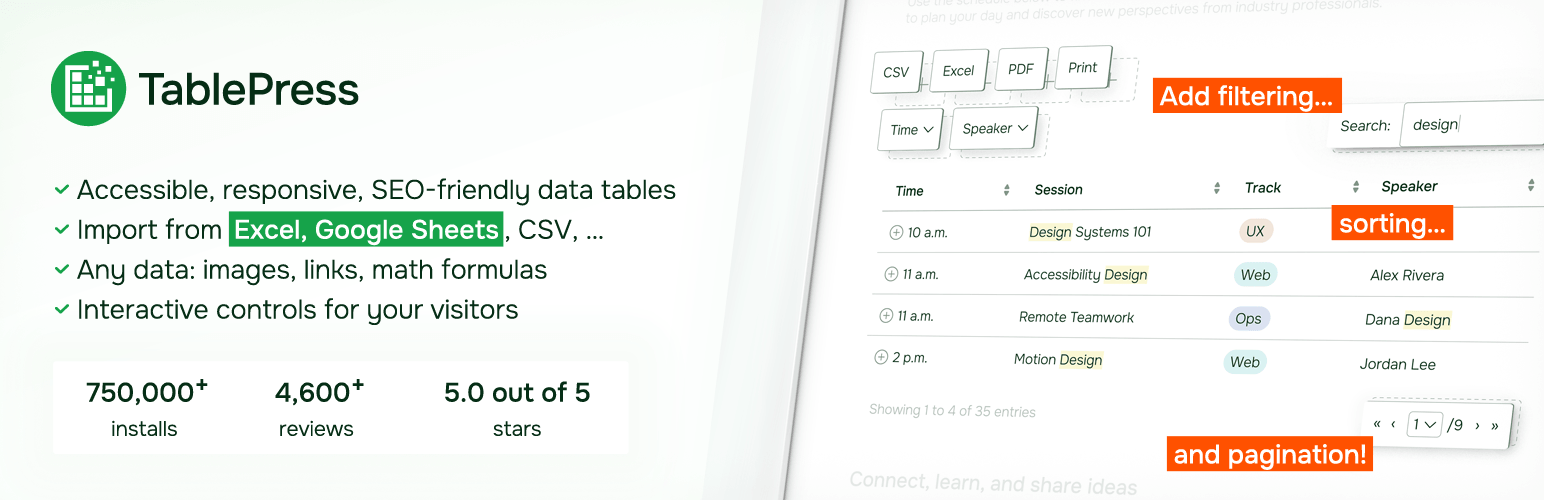
- Add live sorting, pagination, searching, and other interactive features that help visitors find what they’re looking for on any device.
- Use any type of data and enrich your tables with images, links, and even math formulas.
- Import and export tables from/to Excel, CSV, HTML, and JSON files or URLs, including spreadsheet data from Google Sheets, Excel Online, and files stored on Dropbox or OneDrive.
- Embed tables into posts, pages, or other site areas using the block editor, an Elementor widget, or Shortcodes.
- All with no coding knowledge needed!
Even more great features for you and your site’s visitors and priority email support are available with a Premium license plan of TablePress. Go check them out!
Common use cases
TablePress will handle a wide range of tables, from simple price lists to searchable directories and large datasets. Popular examples include:
- Product and model tables
- Service and price lists
- Directories and listings
- Schedules and timetables
- Participant and member lists
- Inventories and collections
- Comparison tables
- Research and statistical data
Accessible and SEO-friendly tables
TablePress creates accessible HTML tables whose content can be searched by visitors, WordPress search, and search engines alike. Interactive features like sorting, filtering, and pagination include accessibility enhancements for screen readers and other assistive technologies.
This makes it easy for visitors to find relevant information, whether they are browsing a large directory, searching a product table, or using your site’s search function.
More information
Visit tablepress.org for more information, take a look at example tables, or try TablePress on a free test site. For latest news, follow @TablePress on Twitter/X or subscribe to the TablePress Newsletter.
How to use TablePress
After installing the plugin, you can create and manage tables on the “TablePress” screen in the WordPress Dashboard.
To insert a table into a post or page, add a “TablePress table” block in the block editor or a widget in the Elementor page builder and select the desired table or use Shortcodes with other page builders.
Beginner-friendly step-by-step tutorials, guides, and how-tos show how to achieve common and popular tasks with TablePress.
You can find examples for common styling changes via “Custom CSS” code on the TablePress FAQ page.
You may also add features like sorting, pagination, searching, filtering, alternating row colors, row highlighting, and more by enabling the corresponding options on a table’s “Edit” screen.
Premium features
Need additional functionality for larger tables or advanced use cases? Premium license plans for TablePress add features such as:
- Options for responsive tables
- Advanced filtering and search
- Fixed table headers and columns
- Automatic periodic imports
- Custom styling options
- And much more
Priority email support is also included. Check out the details on the TablePress website.
Quick facts
Contributors
Tobias Bäthge
Also catalogued by Sourcemap Explorer's tech database
TablePress – Tables in WordPress made easy is one of the WordPress plugins with a Wappalyzer fingerprint, which means Sourcemap Explorer detects it from the framework-level signals as well as the WordPress-specific /wp-content/plugins/tablepress/ asset path. This page is the canonical entry; a deep-dive on the detection signals lives in the dedicated guide below.
How Sourcemap Explorer detects TablePress – Tables in WordPress made easy
TablePress – Tables in WordPress made easy sits at v3.3.3 with 600K+ active installs, a 5.0/5 rating from 4,625 reviews, tested up to WordPress 7.0.2. Its last wp.org update landed 2026-07-08 4:56am GMT, and it has been on the directory since 2012-06-14. Whatever the install count, every site running it serves the plugin's files from the same predictable location — and that is the signal Sourcemap Explorer reads.
WordPress plugins all load assets from a predictable path: /wp-content/plugins/<slug>/. Sourcemap Explorer enumerates every such URL on the rendered page (script tags and stylesheets) and pulls the version from the ?ver= cache-buster query parameter when WordPress emits one. The slug is then cross-referenced against the wordpress.org plugin directory to attach the human-readable name, author, install count, rating and changelog you see on this page.
- 1
Find /wp-content/plugins/tablepress/ in the Network tab
Open DevTools → Network → reload the page. Filter by "JS" or "CSS" and look for asset URLs starting with `/wp-content/plugins/tablepress/`. Each match confirms the plugin is loading on the page. Sourcemap Explorer enumerates every plugin path automatically and lists each one in the popup's Stack tab.
- 2
Read the version from the ?ver= query string
WordPress appends the plugin version as a cache-busting query parameter to its asset URLs (`?ver=3.3.3`). Sourcemap Explorer pulls this version directly. The version on this page (3.3.3) is the latest published on wp.org — the version on a real site may lag.
- 3
Cross-reference with wp.org for human-readable metadata
Once the plugin slug is identified, fetch `https://api.wordpress.org/plugins/info/1.2/?action=plugin_information&request[slug]=tablepress` to read the human-readable name, author, install count, rating and changelog. This page already does that for you.
Plugin ecosystem context
A WordPress table plugin (TablePress, Advanced Tables, Ninja Tables). These render tabular data via shortcode and ship a small client-side library for sorting, filtering and pagination. Within that group, TablePress – Tables in WordPress made easy (600K+ active installs) is tagged csv, excel, spreadsheet, table on wp.org.
Screenshots


Installation
The easiest way to install TablePress is via your WordPress Dashboard:
- Go to the “Plugins” screen, click “Add Plugin”, and search for “TablePress” in the WordPress Plugin Directory.
- Click “Install Now” and after that’s complete, click “Activate”.
- Create and manage tables by going to the “TablePress” screen in the admin menu.
- To insert a table into a post or page, add a “TablePress table” block in the block editor or a widget in the Elementor page builder and select the desired table or use Shortcodes with other page builders.
Manual installation works just as for other WordPress plugins:
- Download the TablePress ZIP file.
- Go to the “Plugins” screen on your site and upload it by clicking “Add Plugin” “Upload Plugin”.
- Or, extract the ZIP file and move the folder “tablepress” to the “wp-content/plugins/” directory of your WordPress installation, e.g. via FTP.
- Activate “TablePress” on the “Plugins” screen of your WordPress Dashboard.
- Create and manage tables by going to the “TablePress” screen in the admin menu.
- To insert a table into a post or page, add a “TablePress table” block in the block editor or a widget in the Elementor page builder and select the desired table or use Shortcodes with other page builders.
FAQ
Many questions, regarding different features or styling, have been answered on the FAQ page and in the extensive TablePress plugin documentation on the TablePress website.
Premium Support
Users with an active TablePress Premium license plan are eligible for Priority Email Support, directly from the plugin developer! Find out more!
Community Support for users of the Free version
For support questions, bug reports, or feature requests, please use the WordPress Support Forums. Please search through the forums first, and only create a new topic if you don’t find an existing answer. Thank you!
In short: WordPress 6.7 or higher, while the latest version of WordPress is always recommended. In addition, the server must be running PHP 7.4 or newer.
TablePress uses the “Translate WordPress” platform. Please see the sidebar on the TablePress page in the WordPress Plugin Directory for available translations.
To make TablePress available in your language, go to the TablePress translations page, log in with a free wordpress.org account and start translating.
You can follow the development of TablePress more closely in its official GitHub repository.
Please report security issues and bugs found in the source code of TablePress through the Patchstack Vulnerability Disclosure Program.
The Patchstack team will assist you with verification, CVE assignment, and notify the TablePress developer.
Visit the plugin website at tablepress.org for the latest news on TablePress, follow @TablePress on Twitter/X, or subscribe to the TablePress Newsletter.
Changelog
Changes in recent versions are shown below. For earlier changes, please see the changelog history.
Version 3.3.3 (July 8, 2026)
- Full compatibility with WordPress 7.0, including an updated visual styling to match the latest WordPress design.
- Bugfix: Properly take into account hidden rows when using a complex filter expression with the “Row Filtering” module. (TablePress Pro and Max only.)
- Bugfix: The sorting arrow icons when using the “Responsive Tables” module’s “Flip” mode no longer break the layout when using small fonts. (TablePress Pro and Max only.)
- Cleaned up and simplified code, for easier future maintenance, to follow WordPress Coding Standards, and to offer helpful inline documentation.
- Several external code libraries and build tools have been updated to benefit from enhancements and bug fixes.
Version 3.3.2 (June 10, 2026)
- Security fix: Reflected XSS. Thanks to Bonds and the Patchstack team for following responsible disclosure policies when reporting this issue!
- Enhancement: When importing tables from a URL, the file format is now detected more reliably, allowing more file formats to be imported successfully.
- Enhancement: The Cloudflare APO plugin’s cache is now cleared when a table is modified.
- Bugfix: The “FIXED()” math function will now work as expected and in the same ways as Excel or Google Sheets.
- Bugfix: The horizontal position of the sorting arrow icons when using the “Responsive Tables” module’s “Flip” mode is correct again. (TablePress Pro and Max only.)
- Cleaned up and simplified code, for easier future maintenance, to follow WordPress Coding Standards, and to offer helpful inline documentation.
- Several external code libraries and build tools have been updated to benefit from enhancements and bug fixes.
Version 3.3.1 (May 20, 2026)
- Full compatibility with WordPress 7.0, including an updated visual styling to match the latest WordPress design.
- Responsive Tables and Fixed Columns modules: The Scroll Buttons feature now also supports tables that are shown in tabs or accordions! (TablePress Pro and Max only.)
- Various code modernizations, removal of outdated legacy code, and optimizations for better performance.
- The list of allowed CSS properties in “Custom CSS” has been extended to include new properties.
- Several minor bugs and inconsistencies have been fixed and improved!
- Cleaned up and simplified code, for easier future maintenance, to follow WordPress Coding Standards, and to offer helpful inline documentation.
- Several external code libraries and build tools have been updated to benefit from enhancements and bug fixes.
Version 3.3 (April 7, 2026)
TablePress 3.3 is a feature, stability, maintenance, and compatibility update. Here are the highlights:
New Sticky Header Bar on the “Edit” Screen
The “Edit” screen for tables has been enhanced with a new sticky header bar that stays visible while you scroll, making it easier to work with long tables:
- The “Save Changes” and “Preview” buttons are now always visible in the header bar, no matter where you are on the page!
- A new “Quick Navigation” dropdown menu lets you jump to any section of the table editor instantly. Use the Cmd/Ctrl+J keyboard shortcut for even faster access!
- A “More actions” dropdown provides quick access to features like copying, exporting, and deleting a table, or to copy its Shortcode for easy embedding.
Improved Help System
- Help buttons are now displayed next to section titles, making help information for features easily available.
- Help modals for premium feature modules now include animations that visually explain what a feature does. (TablePress Pro and Max only.)
Enhancements for Premium Features
- Column Filter Dropdowns: A new “Reset” button option allows site visitors to clear all active filters with a single click! (TablePress Pro and Max only.)
- Individual Column Filtering: The calculation of column widths was improved to prevent layout shifts of header and body cells. (TablePress Pro and Max only.)
- Automatic Periodic Table Import: The configuration screen is now more usable on mobile devices and small screens, with a scrollable table layout. (TablePress Max only.)
On-Demand Translation Loading
- Premium translation files for several languages are now loaded on-demand from the TablePress Translations platform. This ensures you always have the latest translations and reduces the plugin’s file size. (TablePress Pro and Max only.)
Behind the scenes
- Full compatibility with WordPress 7.0, including an updated visual styling to match the latest WordPress design.
- Improved error handling when evaluating math formulas in table cells.
- Various code modernizations, removal of outdated legacy code, and optimizations for better performance.
- Several minor bugs and inconsistencies have been fixed and improved!
- Cleaned up and simplified code, for easier future maintenance, to follow WordPress Coding Standards, and to offer helpful inline documentation.
- Several external code libraries and build tools have been updated to benefit from enhancements and bug fixes.
- TablePress 3.3 requires WordPress 6.7 or newer.
Premium versions
- Even more great features for you and your site’s visitors and priority email support are available with a Premium license plan of TablePress. Go check them out!
Detected by Sourcemap Explorer
We enumerate every /wp-content/plugins/tablepress/ path on the page, and pull the version from the ?ver= query string when WordPress emits one (wp.org currently lists v3.3.3, updated 2026-07-08 4:56am GMT).